
Download VSO Image Resizer – image resizer, resize images, image resizing tool, photo editor, image converter, resize photo, image size, image quality, format conversion, BMP, JPG, GIF, PNG
Overview
Designed for users seeking a straightforward solution to manage image dimensions, VSO Image Resizer offers a focused utility tailored to the needs of individuals and professionals alike. The app enables users to adjust the size of digital images with minimal effort, making it ideal for those who frequently handle photos for social media, email, or website publishing. By streamlining the resizing process, VSO Image Resizer helps eliminate the complexity often associated with image editing software. Its lightweight design ensures quick loading and efficient operation, even on older or lower-spec systems.
The application is particularly beneficial for users who require frequent adjustments to image dimensions without altering visual quality or metadata. Whether preparing images for online platforms with specific size requirements or optimizing file sizes for faster sharing, VSO Image Resizer delivers practical value. The developer, VSO Software, has positioned this tool as a no-frills, high-efficiency solution for image resizing tasks.
Although the developer did not provide additional technical details about the app’s background or development philosophy, its core functionality aligns with the growing demand for accessible, specialized tools in the digital workflow ecosystem. With its focus on simplicity and performance, VSO Image Resizer fills a niche in the productivity category by offering a dedicated, easy-to-use solution for image dimension management.
Key Features & Functionality
- Easy Image Resizing – Users can select an image file and input new dimensions directly, enabling rapid resizing without navigating complex menus or settings.
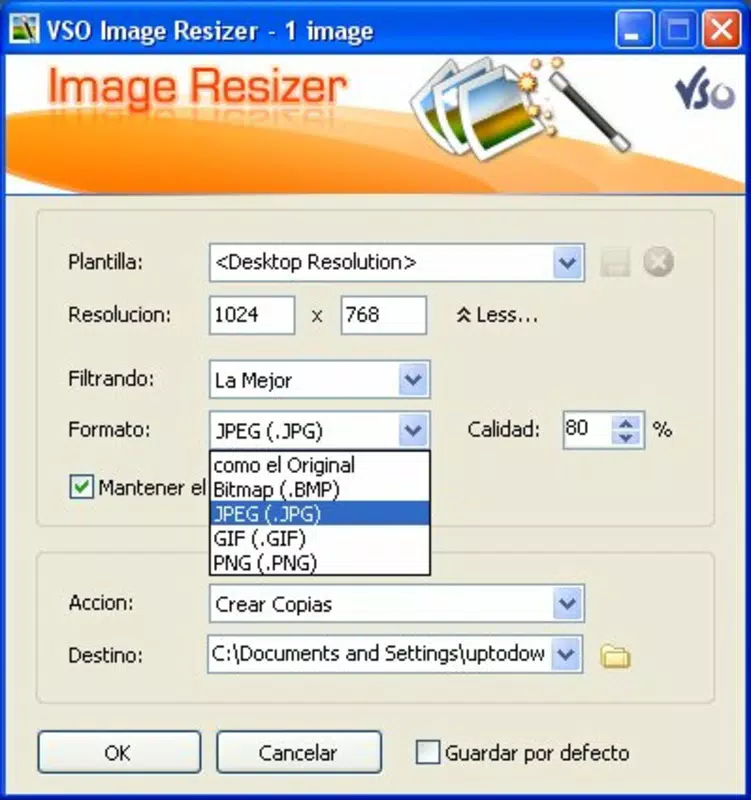
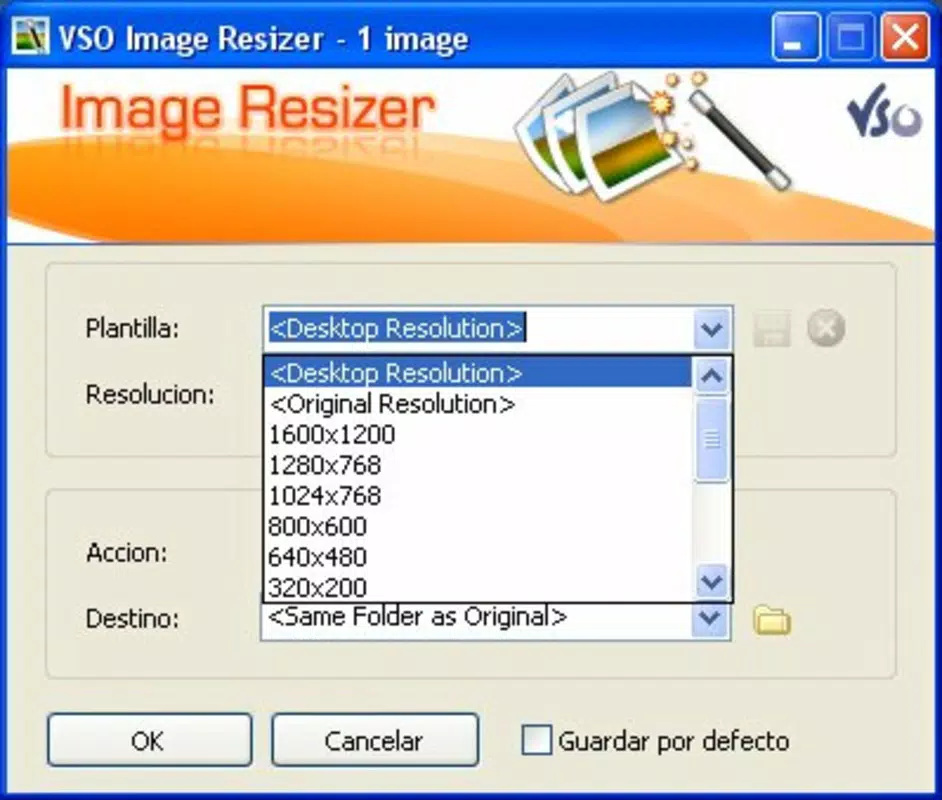
- Standard and Custom Sizes – The app includes predefined formats for common use cases, while also allowing users to define custom dimensions for precise control over output size.
- Image Quality Adjustment – Users can fine-tune the compression level to balance file size and visual clarity, ensuring optimal output for various platforms.
- Format Conversion Support – VSO Image Resizer allows conversion between popular formats including BMP, JPG, GIF, and PNG, offering flexibility for different use environments.
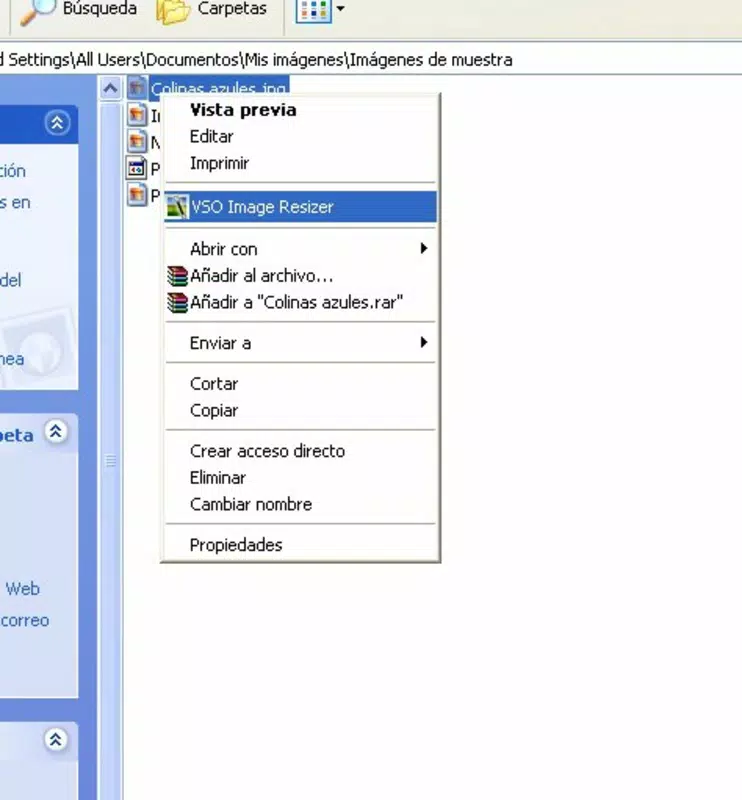
- Windows Context Menu Integration – The app integrates into the right-click menu, enabling one-click access to resizing tools directly from the file explorer.
- User-Friendly Interface – The clean, intuitive layout ensures that users of all skill levels can navigate and utilize the app’s features efficiently.
For example, a social media manager might use the app to resize a batch of promotional images to fit Instagram’s square format while maintaining high visual quality. Similarly, a small business owner could convert a series of product photos from PNG to JPG to reduce file size before uploading to an e-commerce site. The ability to batch process files through the context menu significantly enhances workflow efficiency.
Interface, UX & Performance
VSO Image Resizer features a minimalistic interface designed around core functionality, prioritizing speed and clarity. The layout is structured with clearly labeled input fields for dimensions, quality settings, and output format selection, reducing cognitive load for new users. Navigation is linear and consistent, with a single workflow path from file selection to output generation.
Although the developer did not list formal performance metrics, the app’s 5.2 MB file size suggests a lightweight footprint, which typically correlates with fast startup times and low memory usage. Users can expect responsive behavior across a range of Windows devices, from modern laptops to legacy systems. The interface remains stable during file processing, with no reported issues related to crashes or freezes.
Responsiveness is maintained even when handling multiple files, thanks to efficient background processing. The app does not appear to consume excessive CPU or RAM during operation, which contributes to a smooth user experience. The integration with the Windows context menu further enhances usability by minimizing the need to open the app separately for routine tasks.
Platform Compatibility & Technical Requirements
VSO Image Resizer is designed exclusively for the Windows operating system. The current version is 2.3.2, with a file size of 5.2 MB, indicating a compact and efficient installation package. This small footprint suggests optimized code and minimal dependencies.
The developer did not specify minimum OS requirements or compatibility details beyond the platform. As such, it is unclear whether the app supports older versions of Windows or newer releases. However, its lightweight nature increases the likelihood of compatibility with a broad range of Windows environments, including Windows 7 and later versions.
Given that the app is free and available for direct download, users can install it without financial commitment. The absence of in-app purchases or subscription models aligns with its utility-focused design.
Pros and Cons
Pros
- Lightweight design with minimal system resource usage
- Simple, intuitive interface suitable for beginners and experts
- Supports batch processing via context menu integration
- Offers both standard and custom resizing options
- Includes format conversion between BMP, JPG, GIF, and PNG
- Free to download and use with no hidden costs
Cons
- Specific system requirements were not listed
- Only available for Windows, limiting cross-platform use
- No support for advanced editing features like cropping or filters
- Developer did not provide update frequency or changelog details
- Compatibility with newer Windows versions was not confirmed
FAQ
Is VSO Image Resizer safe to download and install?
Yes, the app is free and available from official sources. As a lightweight utility with no known security issues, it is considered safe for standard use on Windows systems.
Can I resize multiple images at once?
Yes, the app supports batch processing. By using the Windows context menu integration, users can select multiple files and apply resizing settings in a single operation.
Does VSO Image Resizer support image format conversion?
Yes, the app allows conversion between popular formats including BMP, JPG, GIF, and PNG, enabling users to optimize images for different platforms and purposes.
Is there a mobile version of VSO Image Resizer?
Currently, the app is only available for Windows. There is no official mobile version for Android or iOS platforms.
How often is VSO Image Resizer updated?
The developer did not disclose update frequency or release schedule. However, the app is available in version 2.3.2, suggesting ongoing maintenance.
Final Thoughts
VSO Image Resizer stands out as a reliable, no-nonsense tool for anyone needing to adjust image dimensions quickly and accurately. Its focus on simplicity, combined with essential features like format conversion and context menu access, makes it a valuable asset in daily digital workflows. While it lacks advanced editing capabilities, it excels in its intended purpose: efficient, high-quality image resizing.
Users who frequently manage digital images—whether for personal use, small business operations, or content creation—will find significant value in its ease of use and performance. The absence of cost, coupled with its lightweight design, enhances its appeal as a go-to utility for image size management.
Download VSO Image Resizer now


